
Screenshots

Introduction
Poke Genie - Remote Raid IV PvP is an essential companion app for Pokémon Go trainers, boasting a user-friendly interface and a wealth of features designed to enhance gameplay. Developed by Poke Genie, this app has garnered over 20 million downloads, establishing itself as the most popular Pokémon Go companion app worldwide. With version 8.14.5, Poke Genie allows players to evaluate hidden values, analyze battle stats, organize their Pokémon collection, and plan raid and PvP battles effectively. The app is designed to be safe, reliable, and simple to use, making it a must-have for players looking to improve their gaming experience.
Graphics & Gameplay
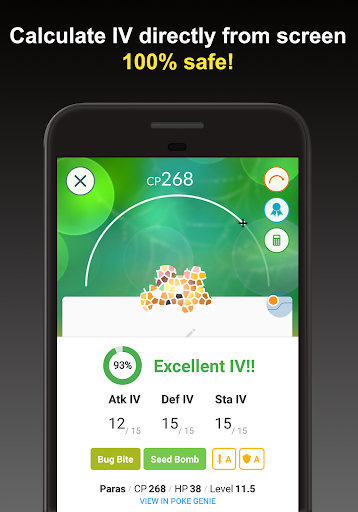
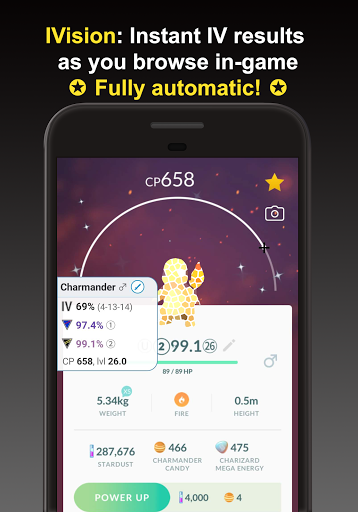
The visual design of Poke Genie is both sleek and intuitive. The app employs a modern aesthetic, featuring a clean layout that emphasizes usability. From the screenshots, users can see a vibrant interface that highlights key information with ease. The color palette is bright and engaging, with Pokémon-themed graphics that resonate with fans of the franchise. Important elements are displayed prominently, enabling trainers to quickly access IV checks, battle simulations, and type effectiveness. The app's animations are smooth, contributing to a seamless user experience that feels responsive and polished. Whether you are scanning Pokémon or engaging in remote raids, the graphics maintain a professional standard that enhances the overall gameplay experience.
Key Features
- IV Checker: Evaluate the potential of your Pokémon by scanning the Pokémon page or Team Leader's appraisal screen. The IV checker helps trainers make informed decisions about where to invest stardust and candies.
- Remote Raid Coordinator: Join remote raids with ease by selecting a Raid Boss. Poke Genie matches you with other trainers, allowing you to participate in raids globally, ensuring that no regional or legendary raid bosses are out of reach.
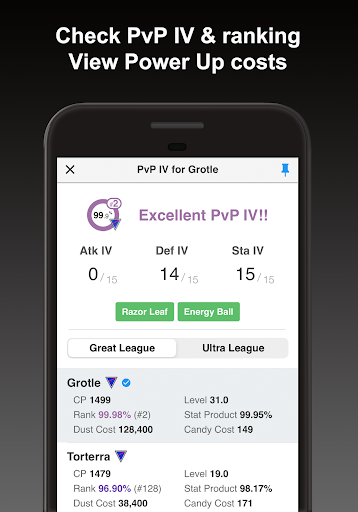
- PvP IV Calculator: This feature calculates optimal IVs for PvP and helps identify the best Pokémon for Great and Ultra Leagues, preventing players from transferring valuable Pokémon.
- Name Generator: Simplify the renaming of your Pokémon with an automatic name generator that formats names for easy pasting into Pokémon Go.
- Battle Simulator: Enhance your raid and gym battle strategies with a simulator that chooses top counters from your collection, improving your win rate while conserving resources.
- Moveset Ranking: Poke Genie runs simulations for moveset performance to help trainers choose the most effective moves for battles.
- Pokedex: A comprehensive data catalog for all Pokémon, detailing base stats, evolution trees, movesets, and more.
- Type Effectiveness Tool: Quickly access type effectiveness information without needing to memorize them, making strategic battles much easier.
- Scan Organizer: Keep track of your scans with an organized history view, allowing for easy filtering and sorting of Pokémon data.
- Power Up/Purification Simulator: Simulate the effects of power-ups and evolutions to make informed decisions on resource allocation.
Mod Features
While Poke Genie is a comprehensive tool, imagined mod features could enhance the user experience even further:
- Premium Unlocked: Access all features without any limitations, enabling a full experience of the app's capabilities.
- No Ads: Enjoy an uninterrupted gaming experience by removing all ads from the application.
- Unlimited Money: Gain unlimited in-app currency to make resource management easier and eliminate the need for grinding.
- Enhanced IV Checker: In addition to standard IV checks, this mod feature could provide real-time updates on IV rankings across all Pokémon.
How to Install APK on Android
Installing the Poke Genie APK on your Android device is a straightforward process. Follow these steps to ensure a smooth installation:
- Enable Unknown Sources: Navigate to your device's Settings, then Security, and enable "Unknown Sources" to allow installation from sources other than the Google Play Store.
- Download the APK: Click on the download link provided below to get the latest Poke Genie APK file.
- Locate the APK File: Open your file manager and find the downloaded APK file, typically in the "Downloads" folder.
- Install the APK: Tap on the APK file and follow the on-screen instructions to complete the installation.
- Launch the App: Once installed, locate the Poke Genie app icon on your home screen or app drawer, and tap to launch.
For a seamless Pokémon Go experience, don’t hesitate to download Poke Genie today!
Call to Action
If you're ready to take your Pokémon Go experience to the next level, download Poke Genie now by following this link and start enhancing your gameplay today!